Open NeoCut and you are on the timeline. Cut clips, add music and text, then export at 720p free without a watermark. Start in your browser on phone or desktop, with no account or download.
Free includes basic editing and selected presets. Pro unlocks all creative tools for £49.99 once.
Inside the editor
A workspace for picture, sound and text.
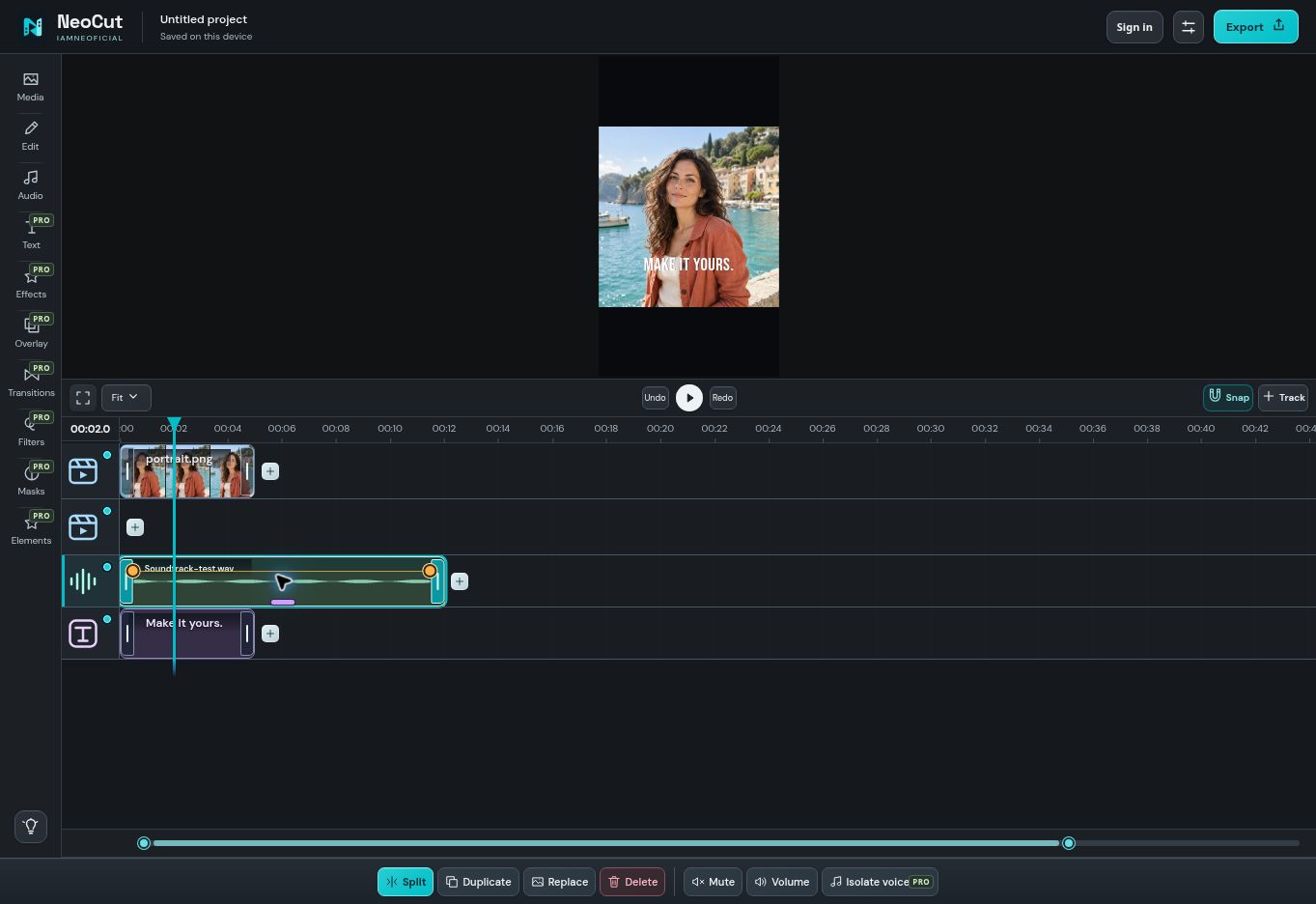
Keep your layers on separate rows, select a clip and work with its commands below the timeline.
Actual NeoCut V183 interface, September 2026. Demonstration project with a still image, a title and a test soundtrack.
Video & composition
Put every piece in its place.
Start with the footage you have. Arrange video, photos and audio across tracks, split a long take into shorter clips and trim the moments you want to keep.
A timeline for layers
Combine video, photo and text layers in one composition. Move and duplicate clips, build overlays and try different arrangements with undo and redo.
Choose landscape, square or portrait formats, including 1:2. Use Pro's per-clip inner zoom and reframing to adjust the picture inside its frame.
Set a canvas colour, fill the background with a blurred version of the same video, or use a photo background.
Looks with range
Choose filters, visual effects and transitions. Free includes five of each; Pro opens the full creative preset collection and colour adjustments.
Blend scenes with a transition, add a stylised finish or keep the picture simple.
GIFs and animated elements
Import an animated GIF, or build a layer with hearts, stickers, emojis, frames, speech bubbles and callouts. Sound visualizers can react to a chosen audio clip.
Free includes GIF import and five presets in each creative element category. Pro unlocks the full collections. Online GIF results carry their own source and licence details; check them before publishing.
Motion and timing
Pro adds transform keyframes, clip animations and speed controls from 0.25× to 4×. Use speed curves to change the pace within a clip.
Slow motion uses the frames in your source video. It does not generate new in-between frames.
Sound & voice
Give each sound its own space.
Balance clip volume as part of your basic edit. Pro adds detailed audio controls for a voice, a music bed or a layered soundtrack.
Mute, separate and isolate
Mute a video or a standalone audio clip directly from its command bar. Basic volume and Mute are included in Free.
Pro adds Detach audio, Keep audio only and voice/background isolation. Isolation processes up to 60 seconds of source audio on your device; the first use downloads a model. Listen before applying, as processing can alter the voice.
Shape bass, midrange and treble at 60 Hz, 150 Hz, 400 Hz, 1 kHz, 3 kHz and 10 kHz, with adjustment from −12 to +12 dB.
Apply a different balance to each clip so speech, music and effects can sit together.
More ways to shape audio
Use reverb, compressor, limiter, de-esser and pitch shifting. Adjust pan and independent fades, duck music under speech or record a voice-over.
Import your own soundtrack or explore the included music and sound effects. Attribution and source information are in the audio credits.
Text & captions
Make the words part of the edit.
Free includes five text templates with editable wording, size, colour and position. Pro unlocks the full template collection, additional fonts, text styles and animations.
Automatic captions are available in Beta. Choose the spoken language and generate captions for up to five minutes of source audio per clip. Review the words and timing before exporting.
Captions may download a local model on first use. Processing time depends on your device and the clip.
A practical caption workflow
Generate, read, refine.
Start from a clip with clear speech. Select its language, generate the captions, then play it back to check names, punctuation and timing.
Use your own judgement on the final text: automatic captions can make mistakes.
Save & export
Finish the video. Keep the project.
Export without a watermark
Free exports at 720p. Pro adds 1080p, 1440p and 4K on supported devices, plus audio-only MP3 export.
Choose video frame rate and bitrate when you need control over the finished file. Available options and rendering speed depend on your browser and device.
Carry on later
Use Save project + media to keep a portable backup, then Open project to resume or move to another device.
A Pro account restores purchased access in up to two active browser sessions. Your media stays on your device; it is not synced by the account.
Some advanced effects are not fully supported in export yet. NeoCut flags unsupported effects before rendering. Higher output resolution cannot recover detail missing from the original footage.